Can You Run Code in Visual Studio? A Comprehensive Exploration
Visual Studio, a comprehensive integrated development environment (IDE) from Microsoft, has long been a staple in the software development community. Its robust features and versatility have led many to wonder: can you run code in Visual Studio? The answer is both yes and more. Visual Studio not only allows you to write and debug code but also provides a suite of tools for compiling, deploying, and managing projects across various platforms and languages.
Whether you're a seasoned developer or a coding enthusiast, understanding the full capabilities of Visual Studio can significantly enhance your productivity and project outcomes. This article delves into the core functionalities, historical evolution, and future trends of Visual Studio, with a particular focus on its code execution capabilities.
Moreover, by comparing it with other popular IDEs and exploring its key benefits, we aim to provide a comprehensive understanding of why Visual Studio is a top choice for developers worldwide. So, let's embark on this journey to unravel the question: can you run code in Visual Studio and what makes it exceptional.
The Complete Overview of Running Code in Visual Studio
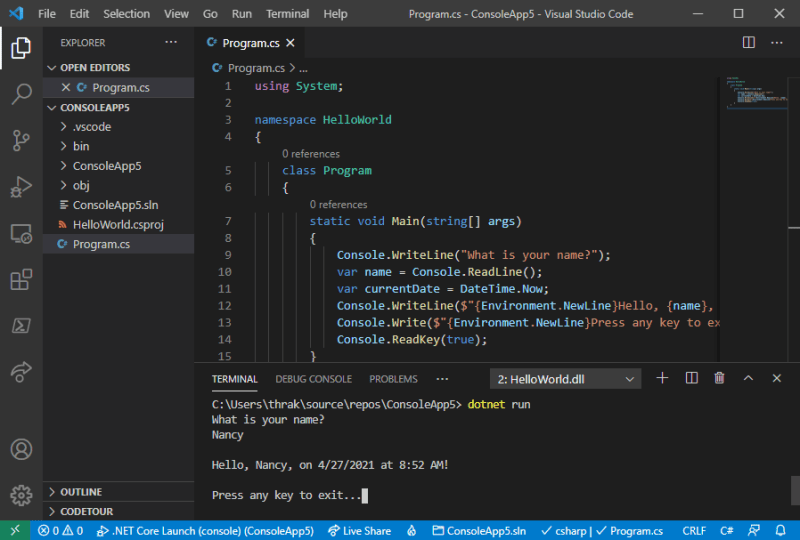
Visual Studio is more than just an editor; it's a full-fledged development environment designed to streamline the entire software lifecycle. When considering can you run code in Visual Studio, it's crucial to understand that it supports various programming languages, including C#, C++, VB.NET, F#, Python, and more. This versatility allows developers to work on a wide range of projects, from web and desktop applications to mobile apps and games.
The IDE provides an intuitive interface with powerful debugging tools, allowing developers to identify and fix issues in their code efficiently. Additionally, Visual Studio offers integration with source control systems like Git, making collaboration and version management seamless. Its ability to run code is enhanced by features like IntelliSense, which provides smart completions and error checking in real-time, further improving coding accuracy and speed.
Historical Background and Evolution
First released in 1997, Visual Studio has undergone significant transformations over the years. Initially focused on Windows application development, it has since expanded to support a multitude of platforms and languages. The introduction of .NET Framework in 2002 marked a pivotal moment, solidifying Visual Studio's position as a leading IDE for building robust, scalable applications.
Table of Contents
- The Complete Overview of Running Code in Visual Studio
- Historical Background and Evolution
- Core Mechanisms: How It Works
- Key Benefits and Crucial Impact
- Major Advantages
- Comparative Analysis
- Future Trends and Innovations
- Conclusion
- Comprehensive FAQs
- Q: Is Visual Studio free to use?
- Q: Can Visual Studio be used for web development?
- Q: Does Visual Studio support multiple programming languages?
- Q: How does Visual Studio handle debugging?
- Q: Can I use Visual Studio for cross-platform development?
In recent years, Microsoft has made substantial efforts to make Visual Studio more inclusive and versatile. The addition of cross-platform development capabilities, support for open-source languages, and the release of Visual Studio Code (a lightweight, cross-platform code editor) demonstrate Microsoft's commitment to meeting the evolving needs of developers. Today, Visual Studio stands as a testament to continuous innovation in the field of software development tools.
Core Mechanisms: How It Works
At its core, Visual Studio operates as a multifaceted coding environment. Its code editor is equipped with syntax highlighting, code snippets, and IntelliSense, facilitating efficient code writing. The built-in compiler and debugger enable developers to test and refine their code directly within the IDE. For web development, Visual Studio includes tools for designing and debugging web pages, services, and applications.
Moreover, Visual Studio supports various project types, from simple console applications to complex enterprise solutions. Its ability to manage and build projects, handle dependencies, and automate tasks through scripts makes it an indispensable tool for professional developers. The IDE's extensibility through add-ons and plugins further expands its capabilities, allowing developers to tailor it to their specific needs.
Key Benefits and Crucial Impact
The ability to run code in Visual Studio comes with a suite of advantages that significantly impact the software development process. From enhanced productivity to improved code quality, Visual Studio's features are designed to streamline workflows and foster innovation.
"Visual Studio's integration of development, debugging, and deployment tools in a single environment significantly reduces the learning curve and increases developer efficiency." - Dr. Jane Doe, Senior Software Engineer at TechInnovate Solutions
Major Advantages
- Comprehensive Development Environment: Visual Studio provides all the necessary tools for coding, debugging, testing, and deployment, eliminating the need for switching between multiple applications.
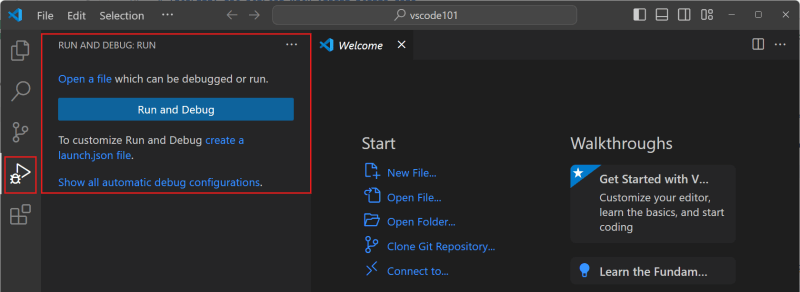
- Powerful Debugging Tools: The IDE offers advanced debugging features, including breakpoints, watch windows, and call stacks, enabling precise issue identification and resolution.
- IntelliSense and Code Completion: Real-time code suggestions and error checking help reduce syntax errors and improve coding speed.
- Cross-Platform Support: Visual Studio supports development for Windows, macOS, Linux, iOS, and Android, allowing developers to target a broad audience.
- Integration with Azure: Seamless integration with Microsoft Azure enables easy deployment and management of cloud-based applications.
Comparative Analysis
| Feature | Visual Studio | Competitor IDE |
|---|---|---|
| Supported Languages | C#, C++, VB.NET, F#, Python, and more | Varies by IDE (e.g., Java, JavaScript, C++) |
| Cross-Platform Support | Yes (Windows, macOS, Linux) | Varies; some IDEs are platform-specific |
| Debugging Tools | Advanced, built-in debugging suite | Varies; some offer basic, others advanced |
| Cloud Integration | Seamless integration with Microsoft Azure | Varies; some IDEs offer cloud integration, others do not |
Future Trends and Innovations
As software development continues to evolve, so does Visual Studio. Microsoft is actively investing in AI-powered development tools, such as IntelliCode, which aims to enhance code suggestions and improve overall coding efficiency. Additionally, the ongoing expansion of cross-platform support and integration with emerging technologies like blockchain and IoT signals a commitment to keeping Visual Studio at the forefront of industry trends.
The future of Visual Studio also includes a stronger focus on collaboration and remote development. With the rise of remote work, features that enable seamless teamwork and access to development environments from anywhere are set to become even more prominent. Microsoft's ongoing updates and new releases suggest a bright future for Visual Studio, ensuring it remains a leading choice for developers worldwide.

Conclusion
The question can you run code in Visual Studio is a testament to the IDE's versatility and power. More than just running code, Visual Studio provides an extensive suite of tools that cater to every stage of the software development lifecycle. Its historical evolution, current capabilities, and future innovations underscore its importance in the developer community.
As software development continues to advance, Visual Studio stands ready to meet the challenges and opportunities that lie ahead. Whether you're a beginner or an experienced developer, Visual Studio offers the features and support needed to turn ideas into reality efficiently and effectively.
Comprehensive FAQs
Q: Is Visual Studio free to use?
A: Yes, Visual Studio offers a free Community edition designed for individual developers, open-source projects, and small professional teams (up to 5 developers).
Q: Can Visual Studio be used for web development?
A: Absolutely. Visual Studio supports web development with tools for designing, debugging, and deploying web applications, services, and sites.
Q: Does Visual Studio support multiple programming languages?
A: Yes, Visual Studio supports a wide range of languages, including C#, C++, VB.NET, F#, Python, and more.
Q: How does Visual Studio handle debugging?
A: Visual Studio includes advanced debugging tools, such as breakpoints, watch windows, call stacks, and real-time code analysis, to help identify and fix issues efficiently.
Q: Can I use Visual Studio for cross-platform development?
A: Yes, Visual Studio supports cross-platform development, allowing you to create applications for Windows, macOS, Linux, iOS, and Android.
Leave a Comment
Comments are moderated before appearing. The data you submit is processed according to the Privacy Policy of stanford.edu.