Navigating the Git Command: Why Command Line Developer Tools Are Essential
In the realm of software development, version control systems have become indispensable tools. Among them, Git stands out for its distributed architecture and powerful features. However, one crucial aspect often overlooked is the requirement for command line developer tools to fully leverage the git command. This article delves into the intricacies of this requirement, exploring its historical background, core mechanisms, key benefits, and future trends.
The git command, at its core, is a command-line interface (CLI) tool for interacting with Git repositories. It offers developers a high degree of control and flexibility, allowing for complex operations that might be cumbersome or impossible through graphical user interfaces (GUIs). Understanding why the git command necessitates command line developer tools is key to unlocking its full potential.
For developers new to the command line, the initial learning curve can seem steep. However, the investment in time to acquire these skills is rewarded with a deeper understanding of version control concepts and more efficient workflows. This article aims to provide a comprehensive overview, demystifying the process and highlighting the importance of command line tools in the Git ecosystem.

The Complete Overview of Git Command and Command Line Developer Tools
Git, developed by Linus Torvalds in 2005, revolutionized version control by introducing a distributed model. Unlike centralized systems, Git allows every developer to have a full copy of the repository, including its entire history. This distributed nature fosters collaboration and enables offline work, making Git a preferred choice for many development teams.
The git command is the primary interface for interacting with Git repositories. It provides a vast array of commands to perform actions such as committing changes, branching, merging, and pushing or pulling updates to/from remote repositories. While GUI tools for Git exist and can be user-friendly, they often pale in comparison to the flexibility and power offered by the command line.
Historical Background and Evolution
The evolution of Git is tightly intertwined with the open-source movement and the rapid growth of collaborative software development. Before Git, version control systems like CVS and Subversion dominated the landscape. However, these systems suffered from limitations such as centralized control and performance issues with large projects.
Table of Contents
- The Complete Overview of Git Command and Command Line Developer Tools
- Historical Background and Evolution
- Core Mechanisms: How It Works
- Key Benefits and Crucial Impact
- Major Advantages
- Comparative Analysis
- Future Trends and Innovations
- Conclusion
- Comprehensive FAQs
- Q: Why is the command line interface preferred for Git over GUI tools?
- Q: Is learning the command line for Git necessary for beginners?
- Q: How do I get started with the Git command line?
- Q: Are there any tools that can make the Git command line easier to use?
- Q: How does the Git command line support collaboration in a team setting?
Git's inception addressed these limitations head-on. Its distributed architecture allowed developers to work independently, fostering a more decentralized and collaborative environment. The early adoption of Git by the Linux kernel development community further solidified its reputation and led to its widespread acceptance in the software development world.
Over time, Git has evolved to become more user-friendly, with improvements in usability and performance. The development of GUI tools and integrated development environment (IDE) plugins has made Git accessible to a broader audience. However, the command line interface remains a cornerstone, offering capabilities that GUI tools have yet to fully replicate.
Core Mechanisms: How It Works
At its heart, Git is a content addressable object database. Every commit (a snapshot of the project at a specific point in time) is identified by a unique SHA-1 hash, calculated based on the commit's content and metadata. This design ensures data integrity and allows Git to efficiently store and retrieve versions of files.
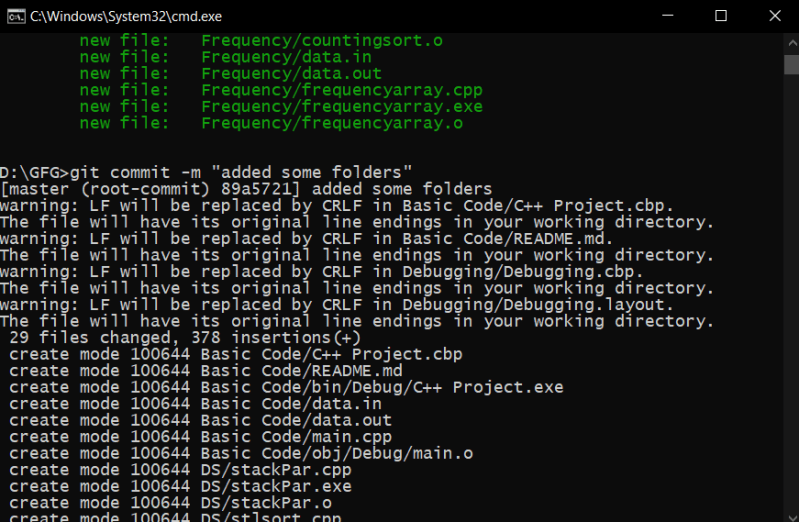
The git command interacts with this database to perform various operations. For instance, when you run git commit, Git calculates the hash for the new commit, stores it locally, and updates the repository's history. Commands like git log and git diff allow developers to inspect the repository's history and differences between commits, respectively.
The command line interface provides direct access to these core mechanisms, enabling developers to perform complex operations with precision and efficiency. This level of control is particularly valuable in scenarios requiring fine-grained manipulation of the repository, such as resolving merge conflicts or rewriting history.
Key Benefits and Crucial Impact
The git command's reliance on command line developer tools brings several key benefits to the table. These advantages have a profound impact on software development workflows, enhancing collaboration, productivity, and code quality.
"Git's command line interface empowers developers with unparalleled control and flexibility, enabling them to navigate complex version control scenarios with ease."
Major Advantages
- Precision and Control: Command line tools allow developers to perform highly specific operations, such as cherry-picking commits or rebasing branches with granular control.
- Efficiency: Keyboard shortcuts and scripting capabilities in command line interfaces can significantly speed up common tasks, reducing the time spent on routine operations.
- Cross-Platform Compatibility: Git commands work consistently across different operating systems, ensuring a uniform experience regardless of the developer's environment.
- Deep Integration: Command line tools often integrate seamlessly with other developer utilities and scripts, facilitating automation and customized workflows.
- Learning Curve as an Investment: While the command line may initially appear daunting, mastering it equips developers with skills applicable across various tools and technologies, enhancing their overall toolkit.
Comparative Analysis
| Feature | Command Line (Git Command) | GUI Tools |
|---|---|---|
| Flexibility | High | Limited |
| Control | Granular | Simplified |
| Automation | Easy with scripting | Less straightforward |
| Learning Curve | Steep initially, but rewarding | Shallow, more accessible |
Future Trends and Innovations
As software development continues to evolve, so does the landscape of version control systems. While GUI tools for Git are expected to improve, bridging the gap with command line interfaces, the core importance of the git command is unlikely to diminish.
Emerging trends such as GitOps, which leverages Git as the primary infrastructure management tool, underscore the increasing relevance of command line skills. The ability to manage infrastructure as code, combined with the precision and control offered by the command line, positions Git as a pivotal tool for modern DevOps practices.
Furthermore, the integration of machine learning and artificial intelligence in version control systems holds promise for intelligent conflict resolution and automated code review, potentially enhancing the capabilities of the git command even further.

Conclusion
The git command's requirement for command line developer tools is not merely a technical detail but a fundamental aspect of its power and flexibility. Understanding and embracing this requirement opens doors to more efficient, controlled, and collaborative software development workflows.
As the software industry continues to evolve, the command line interface for Git remains a cornerstone, empowering developers to navigate the complexities of version control with precision and agility. Investing time in mastering these tools is an investment in one's ability to collaborate effectively and drive innovation in the digital age.
Comprehensive FAQs
Q: Why is the command line interface preferred for Git over GUI tools?
A: The command line interface offers greater flexibility, precision, and control over Git operations. It allows for complex operations and automation through scripting, which GUI tools often struggle to match.
Q: Is learning the command line for Git necessary for beginners?
A: While not strictly necessary, learning the command line early on provides a solid foundation in version control concepts and best practices. It empowers beginners with skills that become increasingly valuable as they advance in their careers.
Q: How do I get started with the Git command line?
A: Start by familiarizing yourself with basic commands like git init, git clone, git commit, and git push. Online tutorials and documentation can be excellent resources for beginners.
Q: Are there any tools that can make the Git command line easier to use?
A: Yes, various tools and plugins exist to enhance the command line experience. For example, git-extras provides additional commands that simplify common tasks. Additionally, IDEs like Visual Studio Code offer integrated Git support with enhanced user experience.
Q: How does the Git command line support collaboration in a team setting?
A: The command line interface enables seamless collaboration by providing consistent tools and workflows across different team members. It facilitates complex operations like merging, rebasing, and resolving conflicts with granular control, ensuring efficient teamwork.
Leave a Comment
Comments are moderated before appearing. The data you submit is processed according to the Privacy Policy of stanford.edu.