Does Your Snap Map Turn Off When Your Phone Dies? Unraveling the Mystery
In the digital age, location-sharing features have become integral to our daily interactions. Among these, Snapchat's Snap Map has emerged as a popular tool, allowing users to share their locations with friends. But what happens when your phone's battery dies? Does the Snap Map automatically turn off, or does it continue to drain your battery in the background?
This question, "does your Snap Map turn off when your phone dies," is a common one among users, especially those concerned about privacy and battery life. Understanding the answer can help users manage their device's power more effectively and maintain control over their shared location data.
Moreover, the query delves into the broader discussion about the balance between convenience and privacy in the digital realm. As location-sharing services become more prevalent, users are increasingly curious about how these features operate and what happens behind the scenes when their devices are not actively in use.
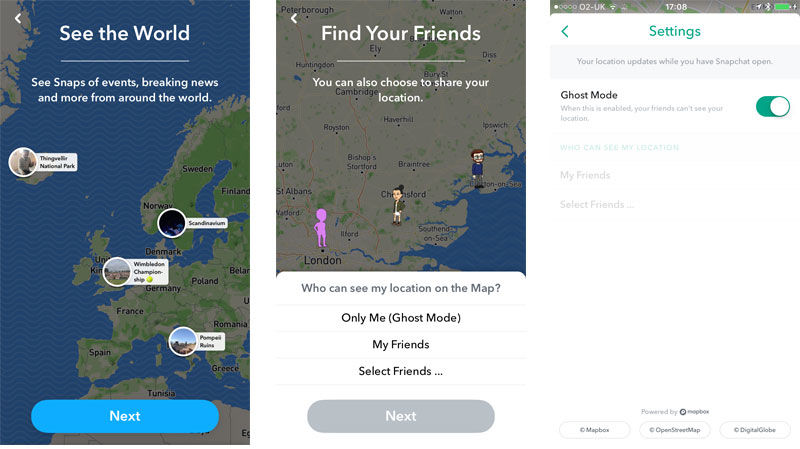
The Complete Overview of Snap Map's Behavior When Your Phone Dies
Snapchat's Snap Map is a location-based feature that allows users to share their real-time location with friends. It leverages a combination of GPS, Wi-Fi, and cellular data to pinpoint a user's location and display it on a map. However, the question of what happens when the phone's battery dies is a critical one for understanding the feature's functionality and its impact on device performance.
Historical Background and Evolution
Introduced in 2017, Snap Map was Snapchat's response to the growing demand for location-sharing services. It was designed to offer a fun and interactive way for users to stay connected and discover new places together. Over the years, the feature has evolved, incorporating additional safety and privacy measures to address user concerns.
Initially, there were concerns about the feature's battery consumption and privacy implications. Snapchat has since made efforts to optimize the feature, ensuring it does not continuously run in the background and drain battery life unnecessarily. This evolution is central to understanding the current behavior of Snap Map when a phone's battery dies.
Table of Contents
- The Complete Overview of Snap Map's Behavior When Your Phone Dies
- Historical Background and Evolution
- Core Mechanisms: How It Works
- Key Benefits and Crucial Impact
- Major Advantages
- Comparative Analysis
- Future Trends and Innovations
- Conclusion
- Comprehensive FAQs
- Q: Does Snap Map continuously track my location?
- Q: What happens to Snap Map when my phone's battery dies?
- Q: Can I manually turn off Snap Map's location sharing?
- Q: Does Snap Map's behavior change based on my phone's settings?
- Q: How does Snap Map compare to other location-sharing services in terms of battery usage?
Core Mechanisms: How It Works
Snap Map operates by periodically updating a user's location, rather than continuously tracking it. This means that the feature is not always active in the background, which helps conserve battery power. When a user's phone battery dies, the behavior of Snap Map depends on several factors, primarily the settings configured by the user.
By default, Snap Map is designed to respect the device's power-saving modes. When the phone's battery reaches a critical level, the operating system will initiate power-saving measures, which can include restricting background activities of apps. In this scenario, Snap Map will typically stop updating the user's location until the device is recharged.
Key Benefits and Crucial Impact
The ability of Snap Map to turn off when the phone dies or enters a low-power state offers several benefits to users. These advantages are central to understanding why this feature has remained popular despite initial privacy and battery life concerns.
"Snap Map's adaptive behavior ensures that users can enjoy the benefits of location sharing without the constant drain on their device's battery."
Major Advantages
- Battery Conservation: Snap Map's design ensures that it does not continuously run in the background, significantly reducing its impact on battery life. When the phone dies, the feature automatically ceases location updates, preserving the remaining power for more critical functions.
- Privacy Protection: By stopping location updates when the phone is low on battery, Snap Map helps maintain user privacy. This prevents unintended sharing of location data when the device is not actively in use.
- Safety Features: Snapchat has implemented safety measures, such as allowing users to manually turn off location sharing at any time. This control ensures that users can manage their privacy settings even when their phone is running low on power.
- Power-Efficient Location Sharing: The feature's periodic location updates, rather than continuous tracking, make it a more power-efficient option compared to other location-sharing services.
- Seamless Integration: Snap Map's integration with Snapchat's core features, such as Stories and Chats, provides users with a cohesive and engaging experience without the constant drain on resources.

Comparative Analysis
| Feature | Snap Map | Competitor A | Competitor B |
|---|---|---|---|
| Background Activity | Periodically updates location, respects power-saving modes | Continuously runs in the background | Updates location at set intervals, but can drain battery |
| Battery Impact | Minimal, turns off when phone dies | High, continuous drain | Moderate, but can still significantly impact battery life |
| Privacy Controls | Strong, with manual override and automatic pause when phone dies | Limited, no automatic pause | Moderate, with manual controls but no automatic battery-saving features |
| User Experience | Seamless, integrated with Snapchat's core features | Intrusive, always running in the background | Balanced, but requires manual management for battery conservation |
Future Trends and Innovations
As location-sharing services continue to evolve, several trends and innovations are expected to shape the future of Snap Map and similar features. These developments will likely address the ongoing concerns about battery life and privacy, making location sharing even more seamless and user-friendly.
One anticipated trend is the integration of advanced power-saving technologies. This could include more sophisticated algorithms that further reduce the battery consumption of location-sharing features, even when they are actively updating a user's location. Additionally, the development of more granular privacy settings will empower users to have greater control over when and how their location data is shared.
Moreover, the rise of context-aware computing could lead to location-sharing features that adapt to a user's surroundings and activities. For instance, Snap Map might automatically adjust its location update frequency based on whether the user is in a crowded urban area or a remote location, further optimizing battery usage.

Conclusion
The question "does your Snap Map turn off when your phone dies" highlights the delicate balance between the convenience of location sharing and the practical concerns of battery life and privacy. Snapchat's Snap Map demonstrates a thoughtful approach to this dilemma, automatically pausing location updates when the phone's battery reaches a critical level.
This behavior not only conserves battery power but also safeguards user privacy, ensuring that location data is not inadvertently shared when the device is not in active use. As location-sharing services continue to evolve, the lessons learned from Snap Map's design will likely influence future innovations, shaping a more user-centric and power-efficient digital landscape.
Comprehensive FAQs
Q: Does Snap Map continuously track my location?
A: No, Snap Map does not continuously track your location. It periodically updates your location, typically every few minutes, to conserve battery power.
Q: What happens to Snap Map when my phone's battery dies?
A: When your phone's battery dies, Snap Map will automatically stop updating your location. This is due to the device's power-saving modes, which restrict background activities to preserve battery life.
Q: Can I manually turn off Snap Map's location sharing?
A: Yes, you have full control over your location sharing settings. You can manually turn off location sharing for Snap Map at any time through the app's privacy settings.
Q: Does Snap Map's behavior change based on my phone's settings?
A: Yes, Snap Map respects your device's power-saving modes. If you have battery-saving features enabled, Snap Map will adjust its behavior to minimize battery consumption.
Q: How does Snap Map compare to other location-sharing services in terms of battery usage?
A: Snap Map is designed to be more power-efficient compared to some competitors. Its periodic location updates and automatic pause when the phone dies contribute to lower battery consumption.
Leave a Comment
Comments are moderated before appearing. The data you submit is processed according to the Privacy Policy of stanford.edu.