Unraveling the Difference Between Adobe Acrobat and Reader
In the digital realm, where documents have transcended physical boundaries, Adobe's suite of PDF tools stands out. Among them, Adobe Acrobat and Adobe Reader have long been cornerstones. However, the difference between Adobe Acrobat and Reader often confuses users. This article aims to demystify these tools, offering a comprehensive overview of their functionalities, historical context, and future prospects.
For many, the terms Acrobat and Reader are interchangeable, yet they represent distinct products catering to different user needs. While both are integral to the world of Portable Document Format (PDF), their capabilities and intended use cases vary significantly.
Whether you're a professional seeking to optimize your document workflow or an individual looking to navigate the digital document landscape, understanding this distinction is crucial. Let's embark on a journey to unravel the intricacies of Adobe Acrobat and Reader.
The Complete Overview of Adobe Acrobat and Reader
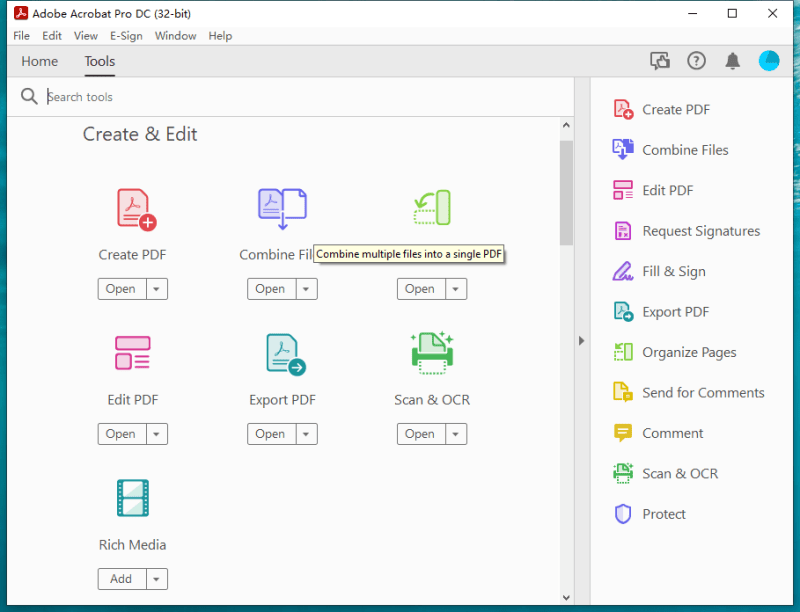
Adobe Acrobat and Adobe Reader are both PDF management tools, but their functionalities differ vastly. Acrobat is a comprehensive PDF editor, creator, and management solution, ideal for professionals and businesses. Reader, on the other hand, is a free PDF viewer designed for basic PDF consumption and interaction.
The primary difference between Adobe Acrobat and Reader lies in their feature sets. Acrobat offers advanced capabilities such as PDF creation, editing, signing, and form filling, along with robust security and collaboration features. Reader, while capable of opening and viewing PDFs, lacks these advanced functionalities.
Historical Background and Evolution
The story of Adobe Acrobat and Reader begins with the inception of PDF itself. In 1993, Adobe Systems introduced PDF as a universal file format for capturing and sharing documents electronically. Adobe Acrobat, then known as Acrobat Exchange, was the first application to create, edit, and view PDFs.
Table of Contents
- The Complete Overview of Adobe Acrobat and Reader
- Historical Background and Evolution
- Core Mechanisms: How It Works
- Key Benefits and Crucial Impact
- Major Advantages
- Comparative Analysis
- Future Trends and Innovations
- Conclusion
- Comprehensive FAQs
- Q: Can Adobe Reader create PDFs?
- Q: What are the primary features missing in Adobe Reader compared to Adobe Acrobat?
- Q: Is Adobe Acrobat suitable for personal use?
- Q: How does the security differ between Adobe Acrobat and Reader?
- Q: What role does cloud integration play in the future of Adobe Acrobat and Reader?
Over time, as PDF gained widespread adoption, Adobe separated the product into two distinct offerings: Adobe Acrobat and Adobe Reader. This strategic move aimed to cater to diverse user needs—professionals requiring advanced PDF capabilities and general users needing a simple, free way to view PDFs.
Subsequent versions of both tools have seen significant enhancements. Acrobat has evolved to include sophisticated features like advanced editing, digital signatures, and robust security options. Reader, while maintaining its core functionality, has added features like cloud integration and basic form-filling capabilities.
Core Mechanisms: How It Works
At the heart of both tools lies Adobe's proprietary PDF technology. However, the way they utilize this technology differs based on their intended purposes.
Adobe Acrobat leverages the PDF format to provide a full suite of document management capabilities. It allows users to create PDFs from various file types, edit existing PDFs, add multimedia elements, and apply security measures. Acrobat's advanced features, such as form creation and digital signatures, further enhance its functionality.
Adobe Reader, in contrast, focuses on PDF consumption. It enables users to open, view, and print PDFs. While it offers basic interactive features like form filling and digital signature verification, it lacks the extensive editing and creation capabilities of Acrobat.
Key Benefits and Crucial Impact
The impact of Adobe Acrobat and Reader on document management and digital communication cannot be overstated. These tools have revolutionized the way we create, share, and interact with documents.
"PDF technology has transformed the way businesses and individuals share information, ensuring documents are viewed and printed exactly as intended."
Major Advantages
- Universal Compatibility: Both tools ensure documents are viewable on any device with a PDF reader, maintaining formatting and layout.
- Enhanced Security: Acrobat offers robust security features, including encryption, digital signatures, and password protection, ensuring document integrity and confidentiality.
- Advanced Collaboration: Acrobat facilitates seamless collaboration through shared reviews, comments, and real-time editing.
- Professional Quality: With Acrobat, users can create polished, professional-looking documents with advanced layout and design options.
- Accessibility: Both tools support accessibility features, making PDFs usable for individuals with disabilities.

Comparative Analysis
| Feature | Adobe Acrobat | Adobe Reader |
|---|---|---|
| PDF Creation | ✓ | ✗ |
| PDF Editing | ✓ | ✗ |
| Form Filling | Advanced | Basic |
| Digital Signatures | ✓ | Verification Only |
Future Trends and Innovations
As digital document management continues to evolve, so too will Adobe Acrobat and Reader. Emerging trends suggest a greater emphasis on cloud-based solutions, artificial intelligence (AI) integration, and enhanced security measures.
Adobe is likely to further integrate its tools with cloud services, enabling seamless document access and collaboration from anywhere. AI could play a more significant role in automating document workflows, enhancing search capabilities, and improving accessibility.
Moreover, as cyber threats grow more sophisticated, Adobe will continue to innovate in document security, offering advanced protection against data breaches and unauthorized access.

Conclusion
The difference between Adobe Acrobat and Reader is more than just a matter of functionality; it reflects a divergence in user needs and expectations. Acrobat caters to professionals and businesses requiring advanced PDF capabilities, while Reader serves general users with its simple, free PDF viewing and interaction features.
As we look to the future, both tools are poised to evolve, leveraging cloud computing, AI, and enhanced security to meet the changing demands of digital document management. Understanding this distinction is crucial for leveraging the right tool for your needs, ensuring optimal efficiency and effectiveness in your document workflows.
Comprehensive FAQs
Q: Can Adobe Reader create PDFs?
A: No, Adobe Reader does not have the capability to create PDFs. It is primarily a PDF viewer and cannot generate new PDF files.
Q: What are the primary features missing in Adobe Reader compared to Adobe Acrobat?
A: Adobe Reader lacks advanced features such as PDF creation, editing, and form filling. It is designed for viewing and interacting with existing PDFs rather than creating or modifying them.
Q: Is Adobe Acrobat suitable for personal use?
A: While Adobe Acrobat offers features that can benefit personal users, such as PDF editing and form filling, its price point and advanced capabilities make it more suited for professional and business use. Casual users might find Adobe Reader more appropriate for their needs.
Q: How does the security differ between Adobe Acrobat and Reader?
A: Adobe Acrobat provides robust security features, including encryption, password protection, and digital signatures. Adobe Reader, while offering basic security measures, does not have the advanced security options available in Acrobat.
Q: What role does cloud integration play in the future of Adobe Acrobat and Reader?
A: Cloud integration is expected to play a significant role in the future of both tools, enabling seamless access to documents from anywhere and facilitating real-time collaboration. Adobe is likely to continue enhancing its cloud-based features to meet the growing demand for remote work solutions.
Leave a Comment
Comments are moderated before appearing. The data you submit is processed according to the Privacy Policy of stanford.edu.